
DISPATCH / CARRIERS DISPATCH APP - FREE APP DOWNLOAD
 This service is for dispatching trucks or clients. As the dispatcher, you are responsible for submitting all completed loads for each truck or client. If clients are given access to the Carriers Dispatch app, they can monitor their PES performance while operating under your dispatching service. For PES accuracy, the client must update the app’s starting odometer to match the truck’s actual odometer. Clients also have access to the in-app Load Analyzer to evaluate loads and daily operations.
This service selection does not require Enrollment Training.
As the Agent, you can charge your clients any amount you choose — monthly or annually.
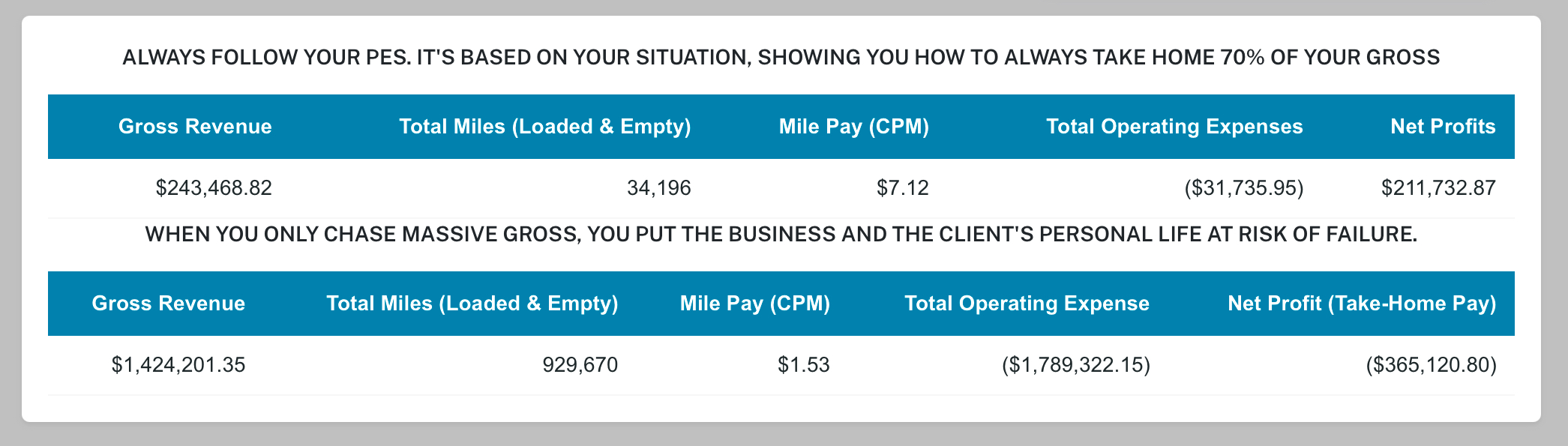
LOAD SUBMISSIONS GENERATE UNIQUE PES RESULTS — GIVING YOU INSTANT PROFIT BUILDING CLARITY FROM BEHIND THE WHEEL
- This app lets clients monitor your profit-building results. Before giving access, make sure their PES is positive and you can help keep it positive — because clients feel every result.
- If your client switches or shares trucks, always verify that the Last Reported Odometer matches the truck's current odometer. If it doesn't, update the App Starting Odometer to match the truck being used, this is required for PES accuracy.
- Since these clients operate active trucking businesses, PES results affect them immediately — accuracy matters.
EVERYTIME THE DRIVER COMPLETES A LOAD YOU SUBMIT IT INTO THE SYSTEM
Follow the steps below to use it effectively.
- After account activation, you control when the client receives access to the app.
- To view your client, go to the **Active Client List** tab, click DETAILS, then click SUBMIT COMPLETED LOAD.
- If the App Starting Odometer is not set, you must update it before submitting any loads.
- You will need the truck’s New Ending Odometer at delivery. Have the client on the phone while submitting the load so they can provide it.
- Complete the load submission. The system will refresh and display the client’s updated PES results.
ALWAYS SUBMIT EVERY LOAD - FOCUS ON BUILDING STRONG POSITIVE PES RESULTS
HELPING YOUR CLIENTS SUCCEED
Settings