

- Start with a conversation. Ask open-ended questions, listen to your client, and understand their goals and needs.
- When you're ready to begin **Enrollment Training**, click the client's **App User ID** to view their details and start their training.
- THE CLIENT SHOULD HAVE ALREADY DOWNLOADED THE OWNER OPERATORS APP - BUT NEED THEIR APP USER ID TO LOGIN
EVERY MILE MATTERS: Loaded and empty miles affect the client's PES. AGENCY - QUICK TRAINING REVIEW
HOW TO CONVERT OWNER OPERATORS INTO THE OWNER OPERATOR APP SERVICE
OWNER OPERATORS APP SERVICE
Sales, Training and Client Activation Playbook
A practical guide for helping Owner Operators understand their loaded and empty miles, operating expenses, completed loads, and Profitability Evaluation Status (PES).
TABLE OF CONTENTS
- The Owner Operator's Biggest Problem
- How the Eye1 Owner Operators Service Helps
- Six Questions That Get the Driver's Attention
- Understanding the Client's Operation
- How the Owner Operators App Works
- Understanding PES
- Demonstrating the Value With Real Results
- The Complete Sales Conversation
- Handling Questions and Objections
- Closing the Sale and Activating the Client
- The First 30 Days
- Summary and Conclusion
1. THE OWNER OPERATOR'S BIGGEST PROBLEM
Owner Operators work hard to keep their trucks moving. They find freight, negotiate rates, drive thousands of miles, purchase fuel, maintain equipment, and pay operating expenses.
But driving thousands of miles and generating thousands of dollars does not automatically mean the business is profitable.
An Owner Operator might gross $8,000 in one week and still struggle to understand how much money the business actually made.
Why?
Because gross revenue does not account for all operating expenses.
Fuel, maintenance, insurance, equipment payments, dispatching fees, factoring fees, and empty miles all affect the final result.
This is the problem Eye1 helps Owner Operators understand.
2. HOW THE EYE1 OWNER OPERATORS SERVICE HELPS
The Eye1 Owner Operators service helps active Owner Operators and Common Carriers understand their trucking operations using their own operating information.
Instead of depending only on gross revenue, rate per loaded mile, or general industry averages, the client can develop a clearer picture of the business.
The service helps Owner Operators:
- Understand what their loaded and empty miles are producing.
- Track completed loads and operating expenses.
- Follow their Profitability Evaluation Status (PES).
- Recognize when operating results are moving positively or negatively.
- Understand how changing freight rates and fuel prices affect their operation.
- Make better-informed business decisions using actual operating information.
3. SIX QUESTIONS THAT GET THE DRIVER'S ATTENTION
Start the conversation with questions the Owner Operator can relate to.
- Have you ever grossed thousands of dollars driving your truck and still wondered, "Where did all the money go?"
- Do you know what all your loaded and empty miles are actually producing after operating expenses?
- Do you know whether your trucking business is currently building profits or losses?
- Would you like to recognize negative operating results before they become a bigger financial problem?
- Would it help to understand how changing fuel prices, freight rates, and operating expenses affect your profits?
- If you could use your own operating numbers to understand what your trucking business is producing, would you want to get started?
These questions should create interest, not make the driver feel criticized.
The objective is to help the client recognize the value of understanding the business behind the truck.
4. UNDERSTANDING THE CLIENT'S OPERATION
Before presenting the service, learn how the Owner Operator currently manages the business.
Ask these questions:
- How long have you been an Owner Operator?
- Do you book your own loads or use a Dispatcher?
- How do you currently track your operating expenses?
- Do you include empty miles when evaluating your loads?
- How do you determine whether a week was profitable?
- How do you recognize when your operating results are getting worse?
Listen carefully to the answers.
Some drivers know exactly how much they gross but have limited information about their total operating costs.
Others track expenses but do not consistently evaluate completed loads or total miles.
Your responsibility is to identify what the client needs help understanding.
5. HOW THE OWNER OPERATORS APP WORKS
The Owner Operators app is designed for clients who manage their own trucking operations.
The client can find and book freight through their chosen brokers or freight-booking services, then use the Owner Operators app to record completed loads and follow operating performance.
The process has four important steps.
Enter accurate truck information, operating expenses, and starting odometer information.
Every Owner Operator has different expenses. The system should reflect the client's actual operation rather than another driver's numbers.
After completing a load, the client records the required load information.
Consistent submissions help create a more accurate operating picture.
If a truck drives 900 loaded miles and 200 empty miles, the truck operated 1,100 total miles.
The business must account for all 1,100 miles, not just the loaded portion.
The client reviews PES, completed loads, expenses, and operating performance.
The goal is to recognize what is helping or hurting the business and make more informed decisions.
6. UNDERSTANDING PES
PES stands for Profitability Evaluation Status.
PES helps show whether the Owner Operator's submitted operating results are moving toward profits or losses.
A positive PES indicates favorable operating results based on the information submitted.
The Owner Operator can review what contributed to the positive direction and continue monitoring the business.
A negative PES indicates unfavorable operating results.
The Owner Operator should review expenses, miles, freight rates, and completed loads to identify what may need to change.
PES does not guarantee future profits or losses. It is an operating indicator based on the information entered.
Accurate truck information, expenses, odometer readings, and completed-load submissions are essential.
7. DEMONSTRATING THE VALUE WITH REAL RESULTS
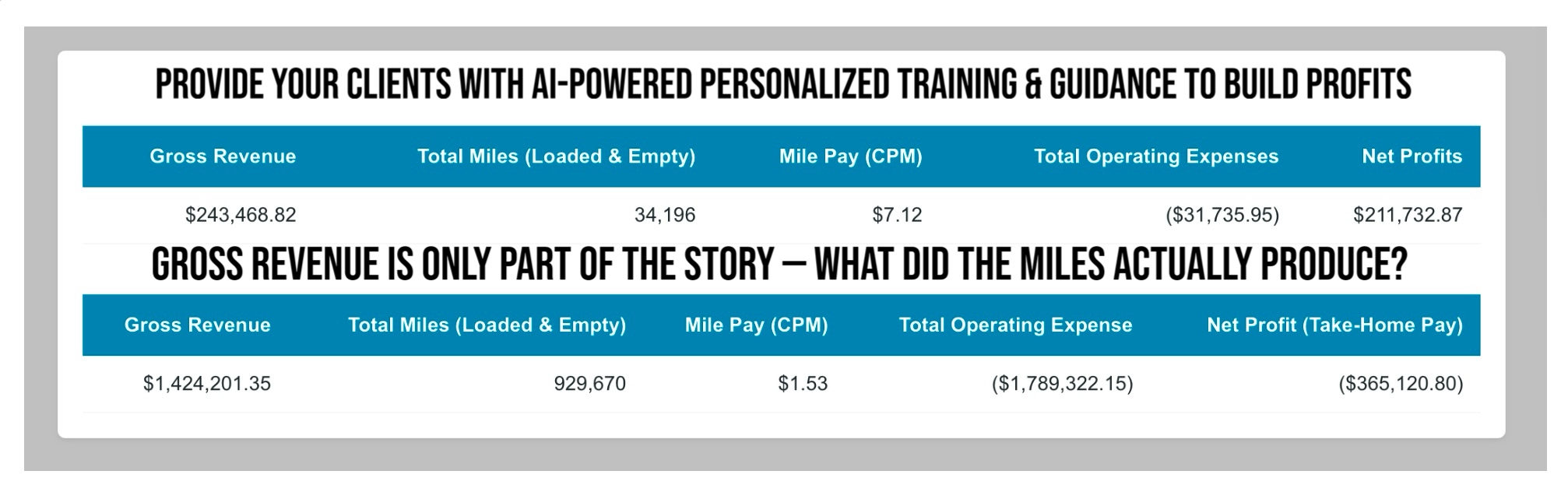
Actual operating examples can help Owner Operators understand why total miles matter.
One Eye1 operating example recorded:
That equals approximately $7.70 in gross revenue per total mile.
This example demonstrates why measuring loaded and empty miles together provides a more complete revenue-per-mile picture.
However, gross revenue per mile is not the same as profit per mile.
Operating expenses must also be considered.
David: Tanya, these results show $94,963.62 in gross revenue across 12,337 total miles.
Tanya: That's a strong amount per mile.
David: It is a strong gross revenue figure. But the important question is what remained after operating expenses.
Tanya: So I shouldn't judge my business only by gross revenue?
David: Exactly. Your goal is to understand what your own operation is producing, not assume another truck's results apply to you.
Historical examples demonstrate what was recorded. They do not guarantee that another Owner Operator will achieve similar results.
8. THE COMPLETE SALES CONVERSATION
David: Tanya, how long have you been operating your truck?
Tanya: About five years.
David: After all the loaded and empty miles you drive, do you know exactly what your trucking business is producing?
Tanya: I know what I gross every week.
David: That's important. But do you know whether those miles are actually building profits?
Tanya: Not always.
David: Have you ever grossed good money and still wondered where it all went?
Tanya: Plenty of times.
David: That's why I wanted to introduce you to Eye1. We help Owner Operators understand their actual operating results instead of looking only at gross revenue.
Tanya: How does it work?
David: We begin by personalizing your operation with your truck information and expenses. Then you submit your completed loads through the Owner Operators app.
Tanya: What does that show me?
David: It helps you follow your PES, which indicates whether your submitted operating results are moving in a positive or negative direction.
Tanya: What if it's negative?
David: Then we review the information to understand what may be contributing to the losses.
Tanya: Will it tell me how much money I'm making?
David: It helps you evaluate your operating results using the information you provide. The more accurate and complete your submissions, the more useful the results become.
Tanya: What about my empty miles?
David: Those matter too. If your truck drives the miles, they need to be considered when evaluating the operation.
Tanya: That makes sense.
David: If you could begin understanding what your miles are producing instead of just watching your gross revenue, would that help you?
Tanya: Yes.
David: Then let's review the service, the current price, and what is included. If it fits your needs, we can personalize your operation and begin with your next completed load.
9. HANDLING QUESTIONS AND OBJECTIONS
That's good. Do your numbers include every completed load, all your loaded and empty miles, operating expenses, and the direction of your overall operation?
Better-paying loads can help, but how do you determine whether the rate is enough for your actual operating expenses?
Your Dispatcher may handle bookings, but understanding your business results is still important. If your Dispatcher manages your bookings and submissions through Carriers Dispatch, that is a separate Dispatcher-managed service.
I understand. But without consistent information, it becomes harder to know what your operation is actually producing. The purpose of submitting completed loads is to help you make better-informed decisions.
That's useful. The question is whether your current system helps you consistently follow completed loads, total miles, expenses, and operating direction.
Of course. Is your main concern the price, the time required, or whether the service will provide information you can use?
10. CLOSING THE SALE AND ACTIVATING THE CLIENT
The close should focus on the problem the Owner Operator wants to solve.
David: Tanya, you told me you want to understand where your money is going, include your empty miles, and recognize when your operating results are getting worse. Is that correct?
Tanya: Yes.
David: Do you see how following your actual operating information and PES could help you understand those problems?
Tanya: Yes.
David: Then let's review the current price and service terms. If everything makes sense, we can get your account started.
After the client agrees, complete the following steps:
- Create or access the Owner Operators app account.
- Verify the truck and starting odometer.
- Enter accurate operating expenses.
- Explain how to submit every completed load.
- Demonstrate how to view PES.
- Review the first completed-load submission.
- Explain how to maintain accurate information over time.
Be clear about any app charges, training fees, recurring services, and what is included.
11. THE FIRST 30 DAYS
Personalize the operating profile, verify the odometer, and begin submitting every completed load.
Review the operating direction and explain what positive or negative results mean.
Discuss how completed loads, empty miles, fuel, freight rates, and expenses affect results.
Review the information submitted during the month and identify operating patterns.
The first thirty days are about developing consistent habits and learning to understand the results.
12. SUMMARY AND CONCLUSION
Owner Operators do not need to be convinced to drive more miles.
They are already driving, booking loads, paying expenses, and working to keep their businesses operating.
What many need is a clearer understanding of what their work is producing.
Eye1 helps Owner Operators connect completed loads, total operated miles, expenses, and PES to understand their operating direction.
The goal is not to promise that every load will be profitable.
The goal is to help Owner Operators recognize what is happening in their business so they can make better-informed decisions.
"You already own the truck. You're already driving the miles and paying the expenses.
But after all that work, do you know whether your trucking business is actually building profits?
Eye1 helps you understand what your loaded and empty miles are producing by using your own operating information.
Why keep guessing when you can start measuring your results?"
Results depend on accurate operating information. Eye1 does not guarantee earnings or profitability.
Whether your clients already own a truck or are thinking about buying one, the biggest question facing millions in trucking:
“HOW CAN I BUILD PROFITS WHEN FUEL PRICES AND FREIGHT RATES KEEP CHANGING?”
CAN YOUR CLIENTS ANSWER YES TO THESE 6 QUESTIONS? - (CLICK HERE)
1. Do they know what every loaded and empty mile is actually producing?
2. Can they tell if a load makes financial sense before accepting it?
3, Can they recognize when their operation is building profit or accumulating losses?
4. Do they have a plan for recovering the money they invested to get started?
5. Do they know how much revenue their truck needs to produce to reach their monthly profit goal?
6 Can they make informed decisions as freight rates, fuel prices, and operating costs change?
COMPANY DRIVERS — HANDS-ON BEHIND THE WHEEL TRAINING APP
For Class A CDL Company Drivers preparing to become Owner Operators.
 Train using the truck you're already driving to understand miles, loads, results and operating decisions before investing your own money.
LEARN FIRST. BUY LATER. Training Load Payment iis Preset: $1,000.
OWNER OPERATOR — DRIVER'S PERSONALIZED PROFIT-BUILDING ASSISTANT APP
For Class A CDL Owner Operators already operating their own trucks.
 Use actual loads, miles, expenses and results to track PES and better understand what's helping or hurting the operation.
YOUR TRUCK. YOUR MILES. YOUR EXPENSES. YOUR RESULTS.
HOW TO PROVIDE PERSONALIZED TRAINING & GUIDANCE — (CLICK HERE)
Whether your client is a Company Driver preparing to become an Owner Operator or an active Owner Operator, each app provides hands-on, personalized training based on the client's individual situation.
Every driver's situation is different. The system uses information from their actual operation—including miles, completed loads, costs, and results—to provide personalized training and guidance.
With continued use, your clients can gain greater clarity about what their miles and loads are producing, understand their results, identify patterns, and develop stronger profit-focused decision-making skills as fuel prices, freight rates, and operating costs change.
WHAT YOUR CLIENTS LEARN
1. Understand the business behind every mile.
2. Evaluate loads, miles, costs, and results.
3. Track and understand their Profitability Evaluation Status (PES).
4. Recognize when load decisions are helping or hurting their results.
5. Understand why loaded and empty miles both matter.
6. Learn from their individual operation instead of generic advice.
7. Identify problems before they become bigger losses.
8. Develop stronger profit-focused decision-making skills.
Your agency provides the support. The system provides the personalized training and guidance to help each client better understand their operation.