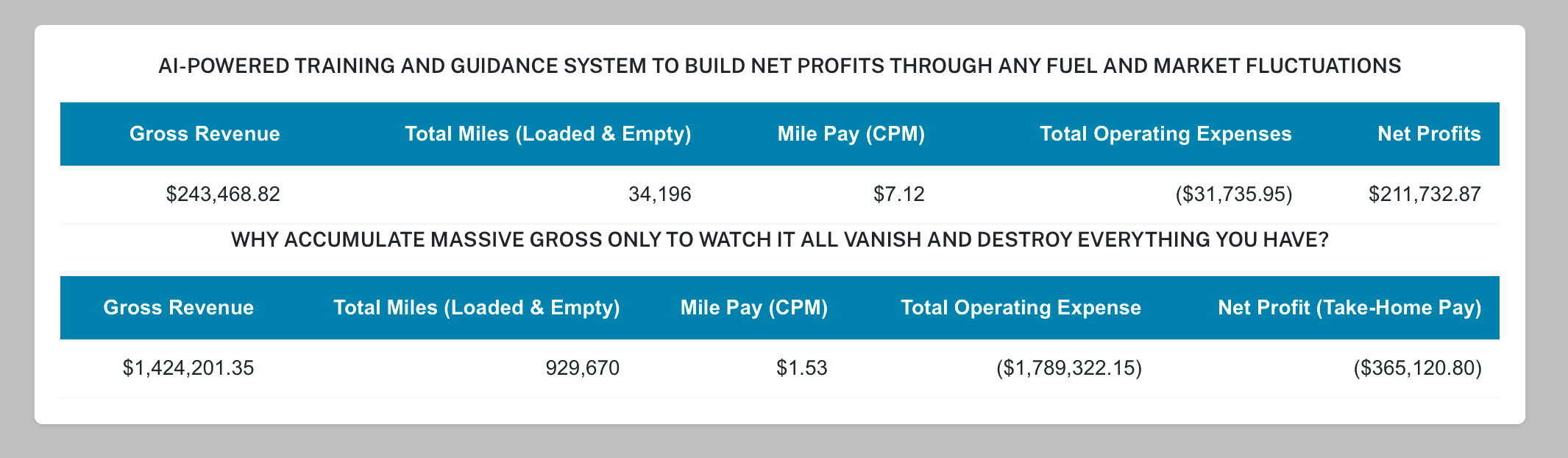

- Below shows Monthly Performance and Annual PES Status—the monthly resets each month. R-Rate how much the client should have made. Everything Below Resets Monthly Except Annual PES.
- The Clients listed below are enrolled in the Carriers Dispatch apps.
- As a Dispatcher, only give the client app access once you've established a positive direction with their PES.
As the Agent, you can charge your clients any amount you choose — monthly or annually.
Every time the truck moves, the odometer increases — and every operated mile changes your PES, either positive or negative.
The PES (Profitability Evaluation Status) is the key to building consistent profits in any market.
ADD - TRUCK / OWNER OPERATOR FOR DISPATCHING AND MANAGING THE OPERATION - OPEN / CLOSE e4c
THE CARRIERS DISPATCH APP - TURN DISPATCHING INTO A MORE VALUABLE SERVICE
The app gives Dispatching Companies another way to help their Owner Operator and Carrier clients.
Instead of only finding and booking loads, your company can see each client’s unique PES status. This helps you focus on booking loads that support a stronger positive PES and help the client work toward greater profit from every mile operated.
THIS SERVICE HELPS YOUR DISPATCHING COMPANY:
✓ Provide more value than simply booking loads
✓ SEE each client’s unique PES status.
✓ UNDERSTAND how completed loads affect their results.
✓ BOOK loads that support a stronger positive PES.
✓ FOCUS on every loaded and empty mile.
✓ HELP clients make better profit-building decisions.
✓ BUILD toward greater profit from every mile operated.
✓ Provide support based on each carrier's unique operation
✓ Build stronger, longer-lasting carrier relationships
✓ Stand out from other dispatching companies
✓ Create opportunities for additional recurring revenue
WHY SHOULD THIS MATTER WITH DISPATCHING SERVICES
A CARRIER DOESN’T JUST NEED MORE LOADS—THEY NEED THE RIGHT LOADS BASED ON THEIR OPERATION.
As a Dispatcher, the Carriers Dispatch App is designed for your clients and helps your company become more than just a dispatcher.
The app allows clients to see how the loads you book are affecting their PES and profit-building progress.
Before giving an Owner Operator access to the Carriers Dispatch App, make sure:
✓ Their PES is moving in a positive direction.
✓ You understand their unique trucking operation.
✓ You know how to select loads that support their profitability goals.
DON’T JUST BOOK LOADS—HELP YOUR CLIENTS UNDERSTAND WHAT THOSE LOADS ARE PRODUCING.
 The Profit Analyzer is a separate app used by many Dispatch Services to evaluate loads before moving the truck.
It provides a Recommended Rate, projected P.E.S. results, and estimated Fuel Loss/Gain, helping Dispatchers make smarter load board decisions and improve client profitability.
HOW TO EVALUATE EACH LOAD - Calculate Total Load Miles:
Previous Load Zipcode → Pickup Zipcode → Delivery Zipcode
In the App enter:
- Load Rate
- Total Miles
- Diesel Fuel Price